Introduction
Most project delays do not come from a lack of effort. They come from teams not knowing which task needs to happen before another one can start. That is where task dependencies in Asana make a real difference. As a trusted Asana local partner serving businesses across the UAE and GCC, Vistar has seen firsthand how setting up dependencies correctly transforms the way teams work. This guide walks you through exactly how to use this feature and why it matters.
What Are Task Dependencies in Asana?
A task dependency is a relationship between two tasks where one cannot begin until the other is complete. In Asana, these are called "blocking" and "waiting on" relationships.
For example, your design team cannot start creating visuals until the content brief is approved. By marking the brief approval as a dependency, Asana will notify the design team automatically once it is done.
"A delayed project is rarely caused by one big failure. It is usually caused by ten small handoffs that nobody tracked. Task dependencies in Asana make those handoffs visible before they become delays."
How to Set Up Task Dependencies in Asana: A Step-by-Step Guide
Step 1: Open the task you want to mark as blocked
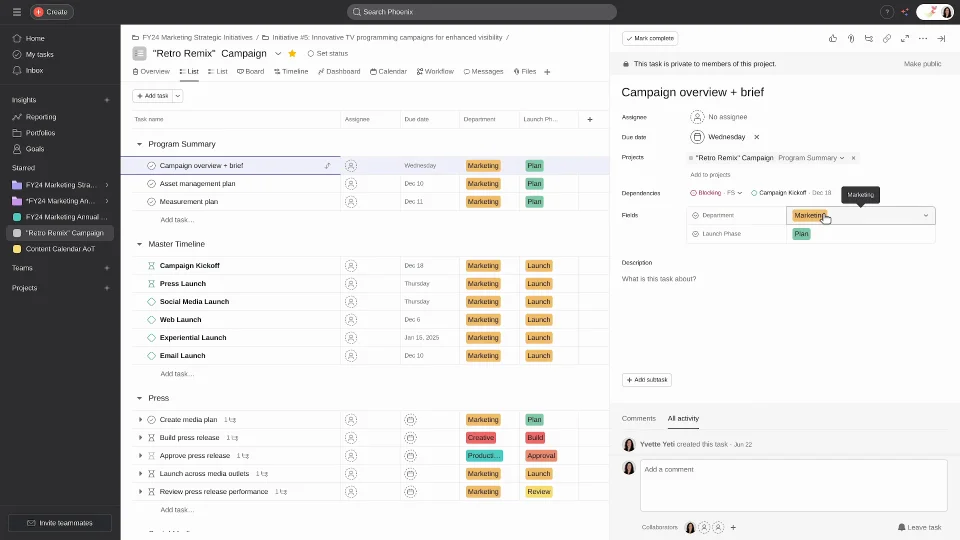
Go to your project in Asana and click on the task that cannot start until something else is finished. This will open the task detail panel on the right side of your screen. Make sure you are opening the dependent task, meaning the one that is waiting on another task to be completed first. For example, if your social media team cannot start scheduling posts until the graphics are approved, open the "Schedule Social Media Posts" task.
Step 2: Find the dependency option in the task panel
Inside the task detail panel, look for the field that says "Mark as dependent on" or click the three-dot menu at the top right of the task panel and select "Mark as dependent on" from the dropdown. This option is available in Asana's Premium, Business, and Enterprise plans. If you are on the free plan, you will need to upgrade to access this feature.
Step 3: Search for and select the blocking task
Once you click "Mark as dependent on," a search box will appear. Type the name of the task that must be completed first. Asana will show matching tasks from across your projects. Select the correct one. That task is now the blocking task, and the one you are working in is the dependent task. In our example, you would search for and select "Approve Graphics" as the blocking task.
Step 4: Confirm the dependency link
After selecting the blocking task, you will see it appear under a "Waiting on" section inside the dependent task panel. The blocking task will also show the dependent task under a "Blocking" section on its own detail panel. This confirms the two tasks are now linked. If you open the blocking task, you will see a notification telling the assignee that completing this task will unblock another.
Step 5: Understand how Asana notifies your team
Once the blocking task is marked complete, Asana automatically sends a notification to the assignee of the dependent task, letting them know they can now move forward. This removes the need for manual status updates or follow-up messages. The dependent task assignee will receive an in-app notification and, depending on their settings, an email alert as well.
Step 6: Use the Timeline view to see the full dependency chain
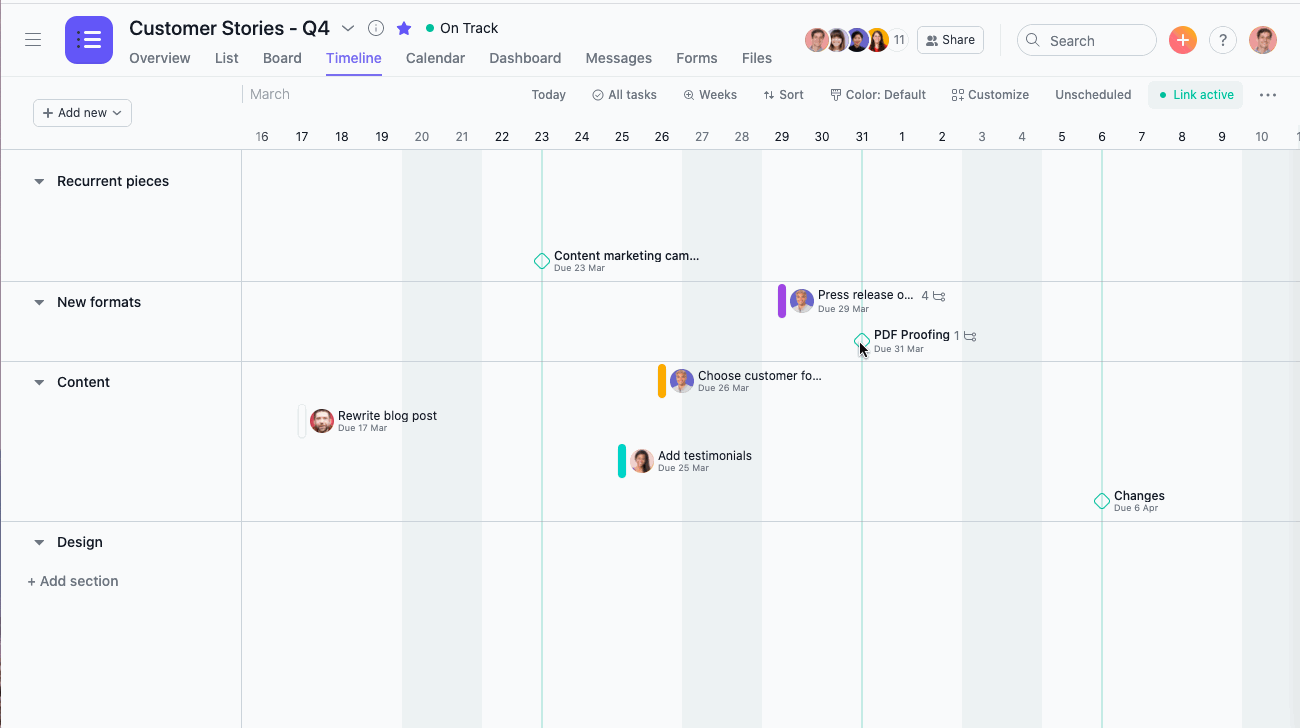
Switch to the Timeline view by clicking the "Timeline" tab at the top of your project. Here, you will see all your tasks laid out on a Gantt-style chart, with dependency arrows connecting the linked tasks. This view makes it easy to spot bottlenecks at a glance. If a blocking task is running late, the arrow will turn red, flagging the risk to downstream tasks so you can take action before it becomes a problem.
Step 7: Adjust dependencies when plans change
Projects change, and your dependencies need to keep up. If a task is removed, reassigned, or replaced, go back into the affected tasks and update or remove the dependency links. To remove a dependency, open the task panel, hover over the linked task under "Waiting on" or "Blocking," and click the X to remove the connection. As an Asana local partner, we know that keeping your dependencies accurate ensures the Timeline view remains reliable for the whole team.
Why Task Dependencies Matter for Your Team
Without dependencies, team members often work in parallel when they should be working in sequence. This leads to:
- Rework because inputs were not ready
- Missed handoffs between departments
- Project managers spending hours following up on status
Task dependencies solve this by making the sequence of work visible to everyone.
Using Dependencies as an Advantage
One of the most common challenges businesses face when adopting Asana is not the tool itself. It is knowing how to configure it in a way that reflects how their teams actually work. As an Asana local partner, Vistar helps organisations in the UAE and GCC map their real workflows into Asana, including setting up dependencies that match how approvals, handoffs, and sequential work actually happen inside their teams.
This is where a certified partner adds value beyond a software licence.
Common Dependency Mistakes to Avoid
- Over-linking tasks: Not every task needs a dependency. Reserve them for tasks where the sequence genuinely affects quality or timing.
- Ignoring the Timeline view: Dependencies are most useful when reviewed visually. Use the Timeline regularly, especially during planning.
- Forgetting to update dependencies when scope changes: If a task is removed or replaced, check that its dependencies are updated to avoid ghost blocks.
Conclusion
Task dependencies are one of the most powerful and underused features in Asana. When configured correctly, they eliminate the guesswork, reduce bottlenecks, and give every team member a clear picture of what they need to do and when. Working with a certified Asana local partner ensures your setup reflects the way your business actually operates, not just a generic template.
Ready to get more out of Asana?
Vistar is a Gold Certified Asana local partner serving businesses across the UAE, KSA, and the wider GCC region. Whether you are implementing Asana for the first time or looking to improve how your current setup works, our team is here to help.
Get in touch with Vistar today and let us build a workflow that actually works for your team.